Exposed Asset Discovery Tools Compared: 5 Approaches
This comparison names at least one weakness of every approach and product discussed. It is based on each vendor’s public documentation, not on hands-on testing, and it is written for change and risk managers, not as legal or compliance advice. Some outbound links may be affiliate links; they never change which tools we cover or how we assess them.
Updated November 13, 2026: Rewritten around the question most readers arrive with: how to find internet-facing assets you don’t know you have. Added seedless EASM (CyCognito), Microsoft Defender EASM, Rapid7 Surface Command, Searchlight Exposure (formerly Assetnote) and OWASP Amass. Also corrected how we described Censys’s attribution caveat and cloud-inventory freshness.
What exposed asset discovery actually has to do
NIST defines the attack surface as the set of points on a system’s boundary where an attacker can try to enter, affect, or extract data (NIST glossary). Exposed asset discovery is narrower and harder. The job is to find the internet-facing part of that boundary that is not in your inventory yet: the marketing microsite on an agency’s cloud account, the subsidiary’s VPN concentrator, the test API someone left on a public IP. Scanning ranges you already know is vulnerability management. Discovery means finding ranges and hostnames you didn’t know to scan.
That distinction is the main way to tell these tools apart. Every tool below can tell you something about assets you name. Only some can find assets you didn’t name, and they do it with different evidence and different false-positive behavior. Federal agencies already work to a fixed baseline: CISA’s BOD 23-01 requires automated asset discovery every seven days and vulnerability enumeration across discovered assets every fourteen days. For a change program the stakes are similar. Under BOD 26-04’s exposure variable, whether an asset is publicly reachable decides whether a KEV fix becomes an emergency change. You can’t make that call for an asset nobody has found.
This post covers which approach finds exposed assets. Two companion posts cover what happens next: reconciling external findings against your internal inventory as a quarterly change, and scoring the criticality of what you find.
The five approaches at a glance
| Approach | Example products | Starting input | Finds assets outside known ranges? | Documented refresh | Main weakness |
|---|---|---|---|---|---|
| DIY reconnaissance | Shodan, OWASP Amass | IP ranges and domains you supply | Partly: subdomains and related records of what you name | Shodan domain monitoring refreshes DNS every 3 hours | No ownership attribution; you build scheduling, review and ticketing |
| Seed-based EASM | Censys ASM, Microsoft Defender EASM, Rapid7 Surface Command | Seeds: domains, IPs, CIDRs, ASNs (Defender also WHOIS orgs, email contacts) | Yes, by expanding relationships from seeds | Defender EASM recurring discovery defaults to weekly; Censys cloud connectors as often as every 4 hours | Coverage is only as good as the seed list; low-confidence candidates need manual review |
| Seedless EASM | CyCognito | Organization name | Yes, including subsidiaries, per vendor docs | Scanning up to daily | Attribution logic and coverage claims are vendor-described; active testing touches production |
| Active network discovery | runZero | Scopes you define (IP ranges, domains, ASNs, country codes) | No; it fingerprints what is in scope | Scheduled scans | No IPv6 ranges in scope; finds nothing outside the scope you define |
| Cloud-native inventory | AWS Resource Explorer, Azure Resource Graph, Google Cloud Asset Inventory | Accounts, subscriptions and projects you control | No; enrolled accounts only | Google says its inventory isn’t built for real-time queries | Blind to accounts outside your organization and to permissions you lack |
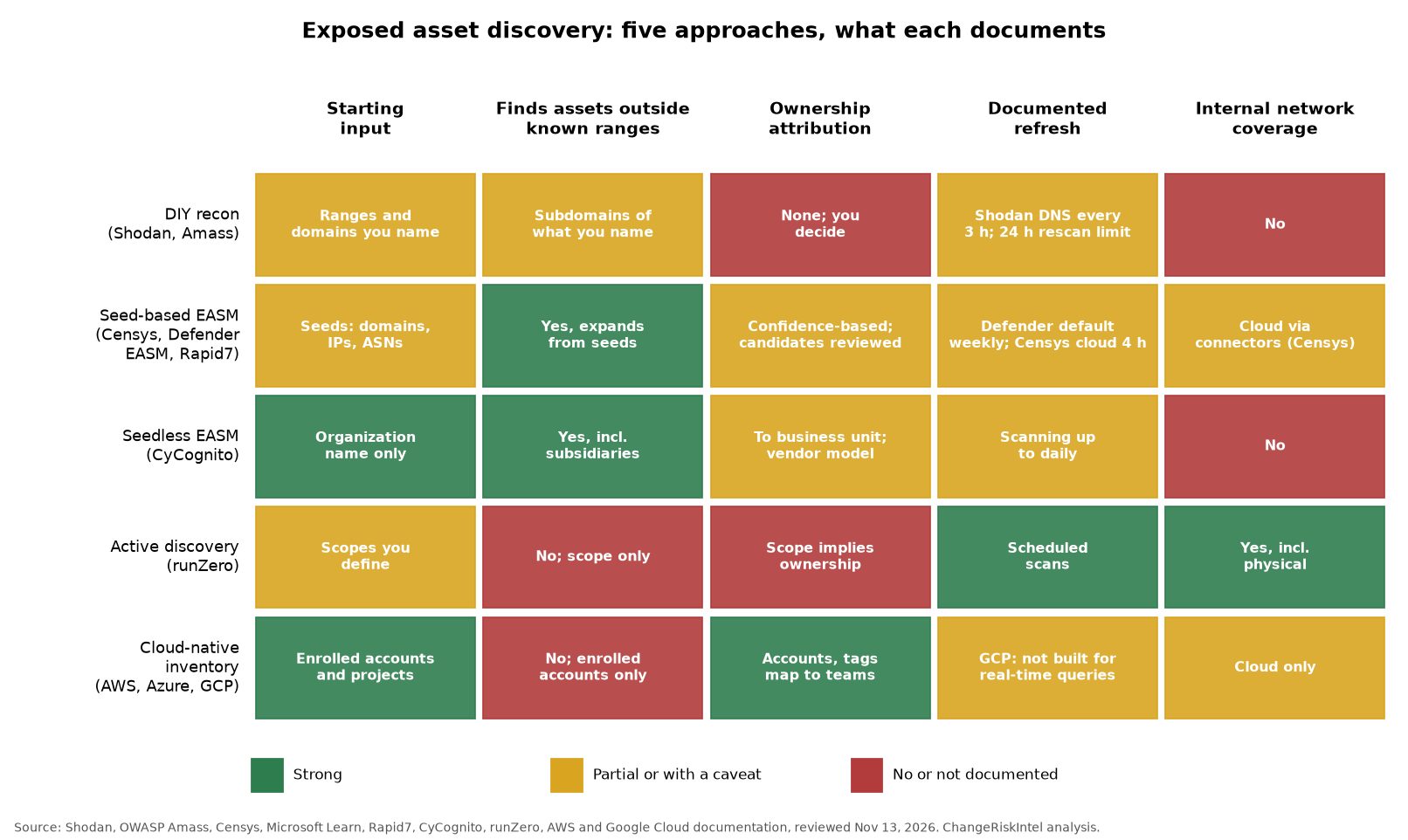
The pattern in the matrix is that the approaches good at finding unknown assets are weak at internal coverage, and the reverse. No row is strong on every column. That’s why the companion reconciliation process exists.
DIY reconnaissance: Shodan and OWASP Amass
Shodan is an internet-wide scan database you query by IP, network, service or banner through its API (Shodan API reference). For discovery, two features matter. Network alerts give a real-time feed of what Shodan collects for a network range you specify (Shodan network monitoring guide). Domain-based monitoring resolves the hostnames of a domain through Shodan’s DNSDB and refreshes DNS every three hours (Shodan domain monitoring). On-demand scans cost one credit per IP, run asynchronously, and an IP crawled recently can’t be rescanned within 24 hours unless you are on an Enterprise plan (Shodan on-demand scanning).
OWASP Amass is the open-source counterpart for the “what do we own” step. Its intel subcommand gathers root domains from sources such as reverse WHOIS and ASN data, its enum subcommand maps subdomains passively or actively, and findings persist in a graph database so you can compare runs (Amass user guide).
Weakness: neither tool decides what is yours. Shodan’s domain monitoring documentation states that a hostname not already in DNSDB will not be added, so a subdomain Shodan has never seen stays invisible. The Amass guide says passive mode “will only obtain information from data sources and blindly accept it”, and many of its data sources need your own API keys. Both are tools rather than programs: scheduling, deduplication, owner assignment and ticketing are yours to build and run.
Change-risk angle: this approach suits teams with a security engineer who can own the pipeline. The output is a list of candidates, not an inventory. Don’t let a Shodan hit go straight into an emergency change until someone has confirmed the asset is yours.
Seed-based EASM: Censys, Microsoft Defender EASM, Rapid7
Seed-based platforms take known facts about you and expand outward. Censys ASM starts from seeds such as domains, IPs, CIDRs and ASNs (Censys seeding guide). It adds a related asset when the evidence crosses a defined confidence threshold, shows the discovery path for each asset, and lets you exclude assets you are certain don’t belong to you (Censys attack surface guide). Cloud Connectors with read-only roles pull cloud assets in as often as every four hours (Censys Cloud Connectors).
Microsoft Defender EASM takes a wider seed set (domains, IP blocks, hosts, email contacts, ASNs and WHOIS organizations) and discovers recursively. Strongly connected assets become Confirmed Inventory, and Microsoft notes that confidence drops at third- and fourth-level connections. Assets land in states such as Approved Inventory, Candidate and Requires Investigation, and Candidates must be reviewed manually (Microsoft Learn: what is discovery). Recurring discovery groups default to a weekly cadence, and exclusions apply only to future runs (Microsoft Learn: managing discovery).
Rapid7 Surface Command discovers the external attack surface from seeds such as registered domains and public IP networks. Its dynamic seed queries can pull seeds from NetBox or InsightAppSec, but they are inactive by default (Rapid7 Surface Command docs).
Weakness: coverage depends on the seeds. An acquisition whose domains never made it into the seed list may never be found. Confidence-based expansion also produces a review queue: Microsoft’s Candidate and Requires Investigation states are work someone has to do. Censys itself says accurate attribution “is especially challenging in cloud environments, where change is sudden and frequent and where many services are unnamed and unattributable by conventional methods” (Censys Cloud Connectors). Rapid7’s public page on external assets doesn’t describe how organization attribution works or how often it scans, so ask before you buy.
Change-risk angle: the seed list is a controlled configuration, so treat seed and exclusion changes as changes, with a record of who removed what. Rapid7’s NetBox-driven seeds are the closest documented link between a source of truth and the external scope. The per-asset discovery path is useful audit evidence when you have to justify why an asset was brought into scope.
Seedless EASM: CyCognito, and Censys vs CyCognito
CyCognito describes “zero-input discovery”: it starts from the organization’s name, with no seeds, agents or credentials. It then builds a graph of the business and its assets from DNS, certificate transparency logs, web crawling and port scanning. Each asset carries a discovery path and an attribution chain, and the vendor says “daily scanning is the highest frequency available” (CyCognito discovery). Its platform overview describes continuous, active security testing of exposed assets with nothing to deploy (CyCognito platform overview).
So the practical Censys vs CyCognito difference is where discovery starts. Censys expands from the seeds you give it and asks you to prune what isn’t yours. CyCognito tries to work out your organizational tree, including subsidiaries, before it looks for assets. If your problem is acquired companies and brands nobody has written down, a seedless start is the documented answer. If you have a reliable domain and IP register, seeds give you more control over what enters scope.
Weakness: seedless attribution is a vendor model you can’t fully inspect. Its accuracy claims, including “3 times the visibility of port scanners” in the platform overview, are marketing statements, not independent results. Daily is the fastest documented scan cadence, which is slower than an hourly service. Active testing also means traffic against production systems.
Change-risk angle: if a platform actively tests your exposed assets, register that testing as a standard change, with source IPs, windows and an escalation contact. Otherwise your own detection may flag it, or a fragile legacy host may fall over without any record explaining why.
Assetnote alternatives after the Searchlight acquisition
Searchlight Cyber announced its acquisition of Assetnote on January 29, 2025 (Business Wire). The attack surface product is now sold as Searchlight Exposure. Searchlight says it scans hourly, cross-references versions to confirm exposures, and can rerun the original exploit after remediation to confirm the fix (Searchlight Cyber: Assetnote).
If you are evaluating alternatives, compare on the axes that changed hands, not on brand. Ask about scan frequency (hourly versus daily or weekly), whether exposures are validated or only version-matched, and how a new asset is attributed to you. Weakness: the hourly cadence and the “96% faster” claim on that page are vendor statements, and exploit-based validation sends exploit traffic at production systems. That needs the same standard-change treatment as active testing, and arguably a stricter one.
The same reasoning applies to anyone comparing against Rapid7 Exposure Command, which aggregates native and third-party exposure findings through more than 450 integrations (Rapid7 Exposure Command docs). An aggregator is only as good as the discovery feeding it. Check which of the approaches above is actually finding the assets.
Active network discovery: runZero
runZero scans the scopes you define (IP ranges, domains, ASNs, country codes) from Explorers, including hosted External Explorers that scan public IP space (runZero discovering assets). Its documented external use case is to define external ranges, domains and subdomains, then scan from runZero’s hosted zones (runZero use case library). It also gathers data through passive sampling and integrations (runZero gathering data). runZero argues that authenticated scans and EDR data alone are “no longer sufficient” for a complete inventory, and recommends API queries only for software-defined infrastructure such as cloud, not for physical networks (runZero on BOD 23-01).
Weakness: runZero finds and fingerprints what is inside the scope you give it, so it doesn’t discover unknown ranges. Its documentation also says IPv6 ranges aren’t supported as scan scope, and external scope must be public IPs or resolve to public space.
Change-risk angle: runZero is the internal side of the comparison. It can confirm what a host actually is, including on physical networks EASM never sees, so you can tell whether a KEV-affected version is present.
Cloud-native inventory: AWS, Azure, Google Cloud
The cloud providers’ own inventories are authoritative for what you have enrolled. AWS Resource Explorer searches across an organization’s accounts only after you set up AWS Organizations trusted access, an aggregator index and views. It searches accounts with active indexes, and Quick Setup does not deploy to the management account (AWS Resource Explorer multi-account docs). Azure Resource Graph can find public IPs through network interfaces (Microsoft Learn: explore resources), but returns no results for objects you don’t have at least read permission on (Azure Resource Graph overview). Google Cloud Asset Inventory works at project, folder or organization scope, keeps 35 days of history, and Google says it “isn’t designed for real time querying” because results are eventually consistent (Cloud Asset Inventory overview).
Weakness: every one of these is bounded by your organization and your permissions. An account opened on a personal card, a subsidiary’s separate tenant, or a subscription you can’t read doesn’t exist as far as the query is concerned. We previously called this data “near real-time”. Google’s documentation says otherwise for its inventory, so treat freshness as provider-specific.
Change-risk angle: cloud inventory is the right source of truth for ownership of enrolled assets, because tags, accounts and subscriptions map to teams. It’s the wrong tool for discovering shadow assets, which is EASM’s job.
Ownership: what “automatic attribution” means
Several queries that lead here ask for platforms that identify asset ownership automatically. The documentation means organizational ownership. Censys shows the discovery path that ties an asset to your seeds, and Defender EASM sorts assets by confidence state. CyCognito goes furthest: it says every asset is attributed to the right subsidiary, brand or business unit, with evidence attached (CyCognito discovery). None of the pages cited here names the individual who answers for the asset, and a change program needs that person. An asset with no named owner can’t be patched under change control, can’t have its exposure accepted, and can’t be decommissioned.
So the discovery tool’s output has to go through four steps:
- Triage. Confirm the asset is yours using the discovery path, or record an exclusion with a reason.
- Owner. Assign a named owner and create or update the CMDB record. The reconciliation process treats this as a quarterly change with a matrix for each mismatch type.
- Criticality. Score it with the method compared in asset criticality scoring, so that internet exposure and business impact are recorded together.
- Exposure flag. Mark it internet-facing so the next KEV decision under BOD 26-04 and your change risk score use a recorded fact, not a guess.
How to choose
- If you can’t list your subsidiaries’ and acquisitions’ domains with confidence, start with seedless EASM, or a seed-based platform with a deliberate seed-building exercise.
- If you have a reliable domain and IP register and want control over scope, a seed-based platform fits, and Rapid7’s NetBox-linked seeds tie the scope to a source of truth.
- If you have engineering time and a small budget, Shodan plus Amass covers known domains and ranges, but you own the pipeline.
- Whatever you pick for the external view, pair it with an internal view (runZero or cloud-native inventory). Discovery without a reconciliation step only produces a longer list of unowned assets.
Frequently asked questions
What is exposed asset discovery? Finding internet-facing systems that aren’t in your inventory yet, such as forgotten subdomains, subsidiary hosts or cloud services on unmanaged accounts. Vulnerability scanning, by contrast, tests ranges you already know.
How does Censys differ from CyCognito for external asset discovery? Censys ASM expands from seeds you supply and shows a discovery path per asset, with exclusions for what isn’t yours. CyCognito starts from your organization’s name, maps subsidiaries and assets with an attribution chain, and scans up to daily.
What are the alternatives to Assetnote? Assetnote is now Searchlight Exposure after Searchlight Cyber’s January 2025 acquisition. Alternatives include Censys ASM, Microsoft Defender EASM, Rapid7 Surface Command and CyCognito. Compare scan frequency, validation and attribution.
Can Shodan find assets I don’t know about? Only partly. It monitors ranges and domains you specify, its domain monitoring depends on hostnames already in DNSDB, and it doesn’t decide what is yours.
Why can’t cloud provider inventory find shadow assets? It only sees accounts, subscriptions and projects in your organization that you can read. Anything outside that boundary is invisible.
Do EASM tools identify asset ownership automatically? They attribute assets to your organization with evidence, and CyCognito goes down to subsidiary or business unit. None of the documentation reviewed here names an accountable individual, so owner assignment remains your process.
For more tool-by-tool breakdowns, see our tools comparisons beat.
Sources
- NIST: Attack surface (glossary)
- CISA: BOD 23-01, Improving Asset Visibility and Vulnerability Detection on Federal Networks
- Shodan: API reference
- Shodan: On-demand scanning
- Shodan: How to monitor a network
- Shodan: Domain-based network monitoring
- OWASP Amass: User guide
- Censys: Seed your attack surface
- Censys: Understand and investigate your attack surface
- Censys: ASM Cloud Connectors
- Microsoft Learn: What is discovery? (Defender EASM)
- Microsoft Learn: Using and managing discovery (Defender EASM)
- Rapid7: Surface Command, manage external assets
- Rapid7: Exposure Command documentation
- CyCognito: Discovery
- CyCognito: Platform overview datasheet (PDF)
- Business Wire: Searchlight Cyber acquires Assetnote
- Searchlight Cyber: Assetnote / Searchlight Exposure
- runZero: Discovering assets
- runZero: Use case library
- runZero: Gathering data
- runZero: Meeting CISA BOD 23-01 asset-inventory requirements
- AWS: Resource Explorer multi-account search
- Microsoft Learn: Explore your Azure resources with Resource Graph
- Microsoft Learn: Azure Resource Graph overview
- Google Cloud: Cloud Asset Inventory overview
Published August 31, 2026. Last updated November 13, 2026.