Provider Incident Evidence Retention: Keep It Past 90 Days
No affiliate links appear in this article. Retention figures come from each provider’s documentation and status API, checked on November 2, 2026. This is a summary of published guidance and our own data pull, not compliance advice. Confirm evidence requirements with your auditor.
Table of contents
- Why this matters
- Where provider incidents show up in change evidence
- How long each provider keeps the record
- What the audit side expects
- Keeping the record: one pattern per provider
- Linking the evidence to the change record
- What to do about it
- FAQ
- Sources
Why this matters
In March, a provider outage makes your team delay a release, or rush an emergency fix that skips the normal approval. Ten months later, an auditor samples that change and asks why the process was different. The engineer who made the call points to the provider’s health event. By then, the provider has usually deleted it.
Provider health data is built to tell you what’s broken now. It isn’t built to prove next year what was broken then. Our comparison of first-party provider health feeds looked at these feeds as live inputs to an ITSM tool. This piece looks at them from the auditor’s side: how long each record lasts and how to keep it.
Every source we checked keeps less history by default than a 12-month review period. The fix is cheap, but it has to be in place before the incident.
Where provider incidents show up in change evidence
Provider incidents end up in change evidence in four common ways:
- Emergency changes. A provider failure forces an unplanned failover, a config rollback or a traffic shift. The emergency path skipped normal approval, and the provider event is the reason it was allowed.
- Delayed or cancelled changes. A CAB freezes deploys to a region during a provider incident. A scheduled change misses its window, and the record has to explain why.
- Failed changes. A deploy fails because a dependency was degraded, not because the change was bad. Without the provider record, it counts against your change success rate.
- Incident root cause. Your post-incident review names the provider as a cause. Without a copy of the provider’s timeline, that finding rests on memory.
In each case, the provider record is supporting evidence for a decision your organization made. Our guide to SOC 2 Type II evidence covers how auditors build samples from a change population. Any change in that sample whose justification leans on a provider event needs that event to still exist.
How long each provider keeps the record
We checked default retention for the main provider sources a change team would cite. For the two status APIs that cap results by count instead of by time, we pulled the feed on November 2, 2026 and measured how far back it reached.
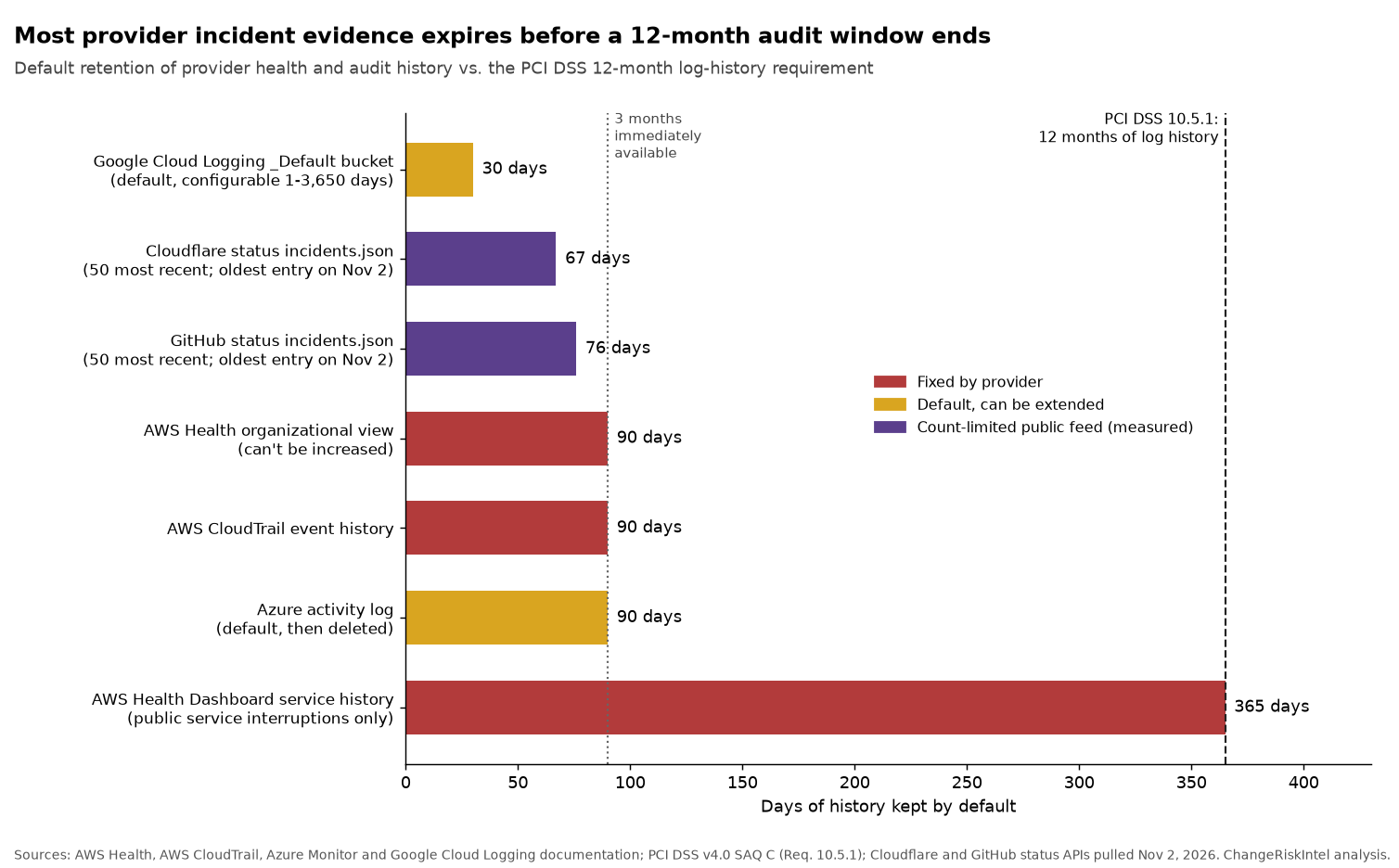
| Evidence source | Default history | Can you extend it? | Weakness for audit use |
|---|---|---|---|
| AWS Health organizational view | 90 days | No | AWS says the quota “can’t be increased” |
| AWS CloudTrail event history | 90 days | Only by creating a trail or event data store | Covers your management events, not provider incidents |
| AWS Health Dashboard service history | 12 months | No | Shows public service interruptions only, not account-specific events |
| Azure activity log (Service Health) | 90 days, then deleted | Yes, up to 12 years in Log Analytics | Service Health events exist only if a resource in that subscription was affected |
| Google Personalized Service Health | ”Limited retention” | Yes, by storing its logs | No retention period stated |
Google Cloud Logging _Default bucket | 30 days | Yes, 1 to 3,650 days | Default is shortest in this group |
Cloudflare status incidents.json | 50 most recent incidents (67 days on Nov 2) | No; archive it yourself | Public and not account-scoped |
GitHub status incidents.json | 50 most recent incidents (76 days on Nov 2) | No; archive it yourself | Public and not account-scoped |
AWS. The organizational view documentation says organizational events “are available for 90 days before they’re deleted. This quota can’t be increased.” For your own API activity, CloudTrail event history holds “the past 90 days of management events in an AWS Region,” and AWS says that “for an ongoing record of events in your AWS account, create an event data store or a trail.” The public AWS Health Dashboard keeps a service history table covering “the last 12 months.” That’s the longest default here, but it only shows public interruptions. A record proving your account was affected doesn’t come from there. Programmatic access has a cost: the AWS Health API needs Business Support+, Enterprise Support or Unified Operations, or calls return a SubscriptionRequiredException.
Azure. Microsoft’s activity log page says Azure “retains activity log events for 90 days and then deletes them.” Service Health events live in that log. Per the activity log schema, the ServiceHealth category covers six event types, and the events “are only created if you have a resource in the subscription impacted by the event.” That scoping helps with relevance. The downside is that a subscription without affected resources has no record at all.
Google Cloud. The Personalized Service Health logs page says the service offers “limited retention of events.” For anything beyond “a few months,” Google tells you to store Service Health logs. Each update to an event’s description, relevance or state is written as a separate log entry under servicehealth.googleapis.com/activity. Google’s Cloud Logging quotas page lists the _Default bucket at 30 days, configurable from 1 to 3,650 days for project buckets.
Cloudflare and GitHub. Both run status pages whose APIs return a fixed count, not a fixed time window. Cloudflare’s status API and GitHub’s status API both describe incidents.json as the “50 most recent incidents.” On November 2, Cloudflare’s 50 reached back to August 27. GitHub’s reached back to August 18. A busy month shortens the window. Google’s public status feed returned 8 incidents back to February 27, 2026 on the same day.
What the audit side expects
The requirements below govern your own logs and your auditor’s files, not the provider’s. They still set the minimum horizon you have to cover.
PCI DSS. Requirement 10.5.1, as printed in the PCI DSS v4.0 SAQ C, says to “retain audit log history for at least 12 months, with at least the most recent three months immediately available for analysis.” The testing steps include examining retention policies, configurations and the logs themselves. When a provider event explains why a change to a cardholder data system happened, a 90-day source doesn’t meet a 12-month horizon on its own.
SOX. Under PCAOB AS 1215, the auditor “must retain audit documentation for seven years from the date the auditor grants permission to use the auditor’s report.” The SEC’s Rule 2-06 of Regulation S-X sets the same seven years for records relevant to the audit. Those rules bind the auditor’s workpapers, not your systems. But whatever you hand over during fieldwork is what goes into the file. If the provider record is gone by fieldwork, there’s nothing to hand over. See our SOX change-control mapping for the ITSM side.
SOC 2. The AICPA’s illustrative SOC 2 Type 2 report includes “tests of controls and results thereof.” Those tests cover changes made across the period, not just the latest ones.
Keeping the record: one pattern per provider
The fix is the same idea everywhere: copy the event into storage you control at the time it arrives, with a retention period set by your policy rather than the provider’s.
AWS: route Health events through EventBridge. AWS says Health delivers events to EventBridge “on a durable basis and attempts to successfully deliver events to EventBridge at least once,” according to the EventBridge integration page. Two limits matter. Rules “can only receive notifications for your AWS account,” so multi-account shops need the organizational view with delegated administrator access. And public events “might take up to one hour to start sending” after you create a rule, so set this up in advance. Because delivery is at least once, deduplicate on the event ARN in your archive.
Azure: add a diagnostic setting. The activity log page points to a diagnostic setting as the way to get “longer retention,” including sending entries to a Log Analytics workspace. Microsoft says there are no ingestion charges for activity logs, and retention charges apply only past the default 90 days. The Log Analytics retention page allows up to two years of interactive retention and up to 12 years in total. One catch: the Azure CLI’s --total-retention-time parameter tops out at 2,556 days, so longer settings need the portal, REST API or PowerShell.
Google Cloud: set a sink and a bucket retention. Route servicehealth.googleapis.com/activity entries to a user-defined log bucket and set its retention to cover your audit period. User-defined project buckets accept 1 to 3,650 days per the quotas page. Google’s routing overview notes that “you can’t extend the retention period of any log bucket that is in a folder or organization,” so create the bucket at the project level.
Cloudflare, GitHub and other status pages: poll and archive. Count-limited feeds can’t be extended. A daily job that saves incidents.json and stores incidents by ID keeps everything going forward. Our cloud status heatmap shows how often these providers post incidents, which tells you how quickly a 50-item feed rolls over.
Linking the evidence to the change record
Archived events only help if someone can connect them to the right change. Add these fields to emergency, delayed and failed change records:
- Provider event ID. The AWS event ARN, Azure tracking ID, Google event ID or status page incident ID.
- Captured copy location. A link to your archived copy, not to the provider’s live page.
- Scope match. The account, subscription or project and the region that tie the event to the changed system.
- Decision. What the team did because of the event (froze, failed over, rolled back, delayed), and who approved it.
- Time correlation. Event start and end in UTC next to the change window.
If the CAB already reviews provider incidents on a standing agenda, that meeting is a good time to confirm each relevant event has an archived copy linked to its change. Our change risk score tool scores a planned change against KEV, Patch Tuesday and freeze-window signals. Saving its output with the approval gives the auditor the “before” side of the story.
What to do about it
- List every provider source your change records cite. Include cloud health feeds, SaaS status pages and CDN or DNS providers. Note each one’s retention from the table above.
- Set a retention target from your longest audit horizon. For many teams that’s PCI DSS’s 12 months plus time for fieldwork. Write it into your logging standard.
- Turn on capture for each source this quarter. EventBridge for AWS Health, a diagnostic setting for Azure, a log sink for Google, and a daily archive job for status pages.
- Back-fill what you still can. Export AWS organizational events and Azure activity log entries from the last 90 days now, before they expire.
- Add the five evidence fields to your change templates. Make the provider event ID and archived copy link required for emergency changes that cite an outside cause.
- Test retrieval once a quarter. Pick a change from six months ago that cited a provider event and confirm you can produce the record in minutes.
More guidance on audit evidence and control design lives on our compliance hub.
FAQ
How long does AWS keep AWS Health events?
AWS Health’s organizational view keeps events for 90 days, and AWS says that quota can’t be increased. The public AWS Health Dashboard keeps 12 months of service history, but only for public service interruptions. To keep account-specific events longer, send them through EventBridge to storage you control.
Does Azure keep Service Health history longer than 90 days?
Not by default. Service Health events are stored in the Azure activity log, which Azure keeps for 90 days and then deletes. A diagnostic setting can send entries to a Log Analytics workspace, where total retention can be set up to 12 years.
Where does Google Cloud store Personalized Service Health history?
Personalized Service Health writes each event update to Cloud Logging and offers only limited retention itself. Google recommends storing those logs if you need more than a few months. Project-level user-defined buckets accept retention from 1 to 3,650 days.
Why does the Cloudflare status API not show older incidents?
Cloudflare’s incidents.json returns the 50 most recent incidents, not a fixed time window. On November 2, 2026 those 50 reached back to August 27. To keep older incidents, archive the feed daily yourself.
Does PCI DSS require keeping provider health events for 12 months?
PCI DSS 10.5.1 requires 12 months of audit log history, with three months immediately available. It applies to your in-scope logs. If a provider event explains a change to an in-scope system, keeping it as long as your other logs is a reasonable practice. Confirm the scope with your QSA.
What should a change record include when a provider incident caused it?
Record the provider event ID, a link to your archived copy, the affected account or subscription and region, what the team decided and who approved it, and the event times next to the change window. Those fields let an auditor follow the decision without the provider’s live page.
Sources
- AWS: Aggregating AWS Health events across accounts
- AWS: Monitoring events in AWS Health with Amazon EventBridge
- AWS: Accessing the AWS Health API
- AWS: AWS Health Dashboard service history
- AWS: Working with CloudTrail event history
- Microsoft: Activity log in Azure Monitor
- Microsoft: Azure activity log event schema
- Microsoft: Manage data retention in a Log Analytics workspace
- Google Cloud: Personalized Service Health logs
- Google Cloud: Cloud Logging quotas and limits
- Google Cloud: Route log entries
- Google Cloud Service Health: incidents.json
- Cloudflare Status API
- GitHub Status API
- PCI SSC: PCI DSS v4.0 SAQ C
- PCAOB: AS 1215, Audit Documentation
- eCFR: 17 CFR 210.2-06, Retention of audit and review records
- AICPA: Illustrative SOC 2 Type 2 report with system description
Published November 2, 2026.