WordPress CVE-2026-119977: When the Upgrade Is the Risk
No affiliate links appear in this article. Version and usage figures come from WordPress.org, NVD and CISA, checked on November 4, 2026. This piece covers change planning and triage only and contains no exploit detail.
Table of contents
- Why this matters
- What CISA and WordPress have published
- Which sites are in scope
- Why the upgrade window changes the change plan
- Forensic triage before you touch the site
- Running the core update as an emergency change
- What to do about it
- FAQ
- Sources
Why this matters
Most KEV entries follow a simple pattern: the flaw is in the running software, and the patch closes it. This one is different. NVD’s description puts the exposure in “predictable, web-accessible staging paths used during full-package core upgrades.” That makes it possible for unauthenticated attackers “to execute code on the server during the upgrade window.”
In other words, the risky moment is the change itself. That matters to a CAB in two ways. First, any core upgrade a site has already run, including automatic ones, is a window worth checking. Second, the upgrade you’re about to run should be planned so the window is short and you can account for it.
The deadline is tight. CISA’s KEV catalog added the flaw on November 3 with a due date of November 6 and set its forensic triage flag to “Yes.” That’s the same three-day, evidence-first pattern we described for php2shell last week.
What CISA and WordPress have published
Here is what the primary sources say, in order:
- October 28. WordPress released 7.1.4 with fixes for multiple issues. The first item listed is “a weakness in the WordPress upgrade process which can lead to remote code execution during the upgrade window.” The post says the fixes “were backported to all branches eligible to receive security fixes (currently through 4.7).”
- October 28. Wordfence, the CNA for the CVE, published its advisory. It rates the flaw CVSS 3.1 8.1 with high attack complexity, no privileges and no user interaction. Affected versions run from 4.7.0 through 7.1.3.
- October 31. NVD published the record, classed as CWE-367, a time-of-check time-of-use race condition. NVD hadn’t added its own score yet.
- November 3. CISA added the flaw to KEV. The required action points to BOD 26-04 and its forensic triage requirements. Ransomware use is listed as “Unknown.”
The same 7.1.4 release covers 22 issues, mostly stored cross-site scripting in blocks and the Interactivity API. According to the 7.1.4 version page, it also includes “an update to the bundled root certificates due to the eMudhra revocation.” If you followed our eMudhra trust store runbook, WordPress’s bundled CA file is one more trust store to mark as updated.
Which sites are in scope
WordPress publishes the branch mix of sites that report to WordPress.org through its stats API. We pulled it on November 4 and grouped branches by the fix each one needs.
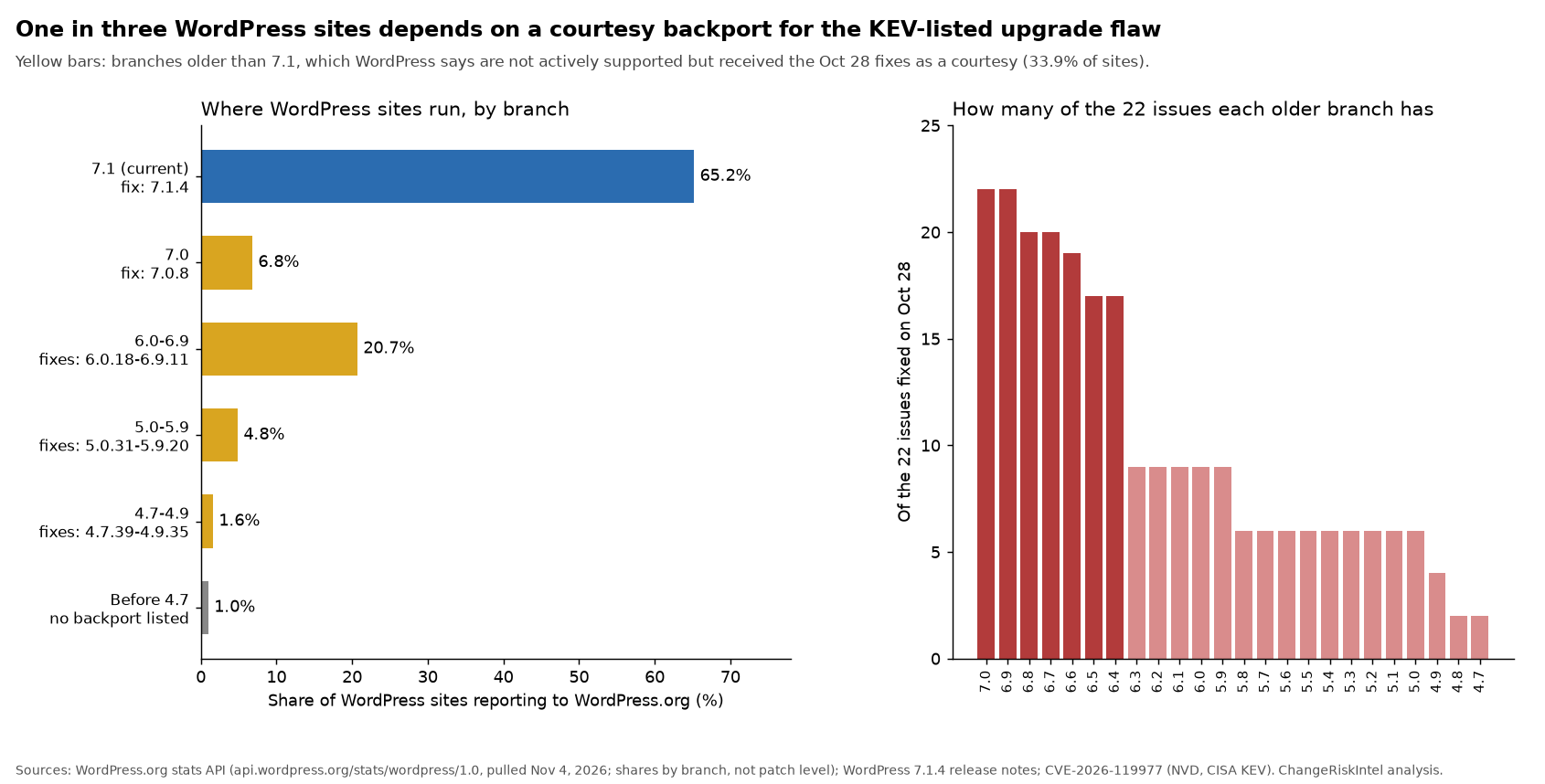
| Branch group | Share of sites (Nov 4) | Fixed release | Of the 22 Oct 28 issues |
|---|---|---|---|
| 7.1 (current) | 65.2% | 7.1.4 | 22 |
| 7.0 | 6.8% | 7.0.8 | 22 |
| 6.0 to 6.9 | 20.7% | 6.0.18 to 6.9.11 | 9 to 22 |
| 5.0 to 5.9 | 4.8% | 5.0.31 to 5.9.20 | 6 to 9 |
| 4.7 to 4.9 | 1.6% | 4.7.39 to 4.9.35 | 2 to 4 |
| Before 4.7 | 1.0% | None listed | Not listed as affected |
Three things stand out.
One in three sites depends on a courtesy backport. Sites on branches older than 7.1 add up to 33.9% of the sites that report in. The version page states plainly that “only the most recent version of WordPress is actively supported.” Older branches got these fixes as a courtesy, and WordPress makes no promise about the next one.
The stats show branches, not patch levels. The API reports 7.1 as a single bucket, so it can’t tell you how many sites already run 7.1.4. Your own inventory has to answer that.
Auto-updates cover most sites, but not all. WordPress’s upgrade documentation says automatic updates “are enabled on most sites,” and minor core releases auto-update by default. The wp-config documentation shows how sites turn that off with AUTOMATIC_UPDATER_DISABLED or WP_AUTO_UPDATE_CORE set to false. Sites with those settings are the ones still waiting for a person to act.
Why the upgrade window changes the change plan
For a normal patch, the change record covers what you changed and whether it worked. Here it also needs to cover when the upgrade ran and how, because that’s where the exposure sat.
WordPress’s update service offers more than one way to get to the fix. A query to the version-check API for a 7.1.3 site returns full, no-content, new-bundled and partial packages for 7.1.4. The CVE text specifically names full-package upgrades. We aren’t going to describe the mechanics. For change planning, what matters is that the upgrade method is now a security-relevant field.
That leads to three planning rules:
- Record the upgrade method and time. Write down whether each site updated through the dashboard, an automatic background update, WP-CLI, a host-managed process or a file deployment from your pipeline, plus the start and end time in UTC.
- Keep the window short and controlled. Run the update when someone is watching, not whenever an automatic job happens to fire. If you can limit public access at your edge or WAF during the update, do it. Our view is that sites deployed from a build pipeline, rather than updated in place, give you the cleanest record. Treat that as a design choice to review with your team, not vendor guidance.
- Look back at past upgrades. Every full core upgrade a site ran before the fix is a window worth checking during triage. That includes automatic updates, which run without anyone watching.
Forensic triage before you touch the site
The KEV entry’s forensic triage flag means BOD 26-04’s evidence steps apply. The implementation guidance says: “Do not alter or remediate systems prior to evidence/artifact collection when possible.” It also tells agencies to keep an evidence collection log and to collect evidence before patching, “as patching may jeopardize the availability of artifacts.”
BOD 26-04 binds federal civilian agencies, but the same order of operations works for anyone. For a WordPress fleet, a practical evidence set looks like this:
- Web server and WAF access logs covering each past core upgrade window, plus the present.
- A file listing with timestamps of the WordPress root,
wp-admin,wp-includesandwp-content, taken before the update. - A checksum report from
wp core verify-checksums, which “verifies WordPress files against WordPress.org’s checksums.” Run it before and after so you can compare the two. - The update history: host control panel logs, WP-CLI shell history and any deployment pipeline records showing when core changed.
- An evidence log entry for each item: who collected it, when, from which host, and where it’s stored.
Our BOD 26-04 decision matrix covers when to run triage and patching in parallel instead of strictly in sequence. With a November 6 deadline, most teams will need parallel tracks: one person collects evidence on site A while another prepares the update for site B.
Running the core update as an emergency change
Once evidence is collected, the change itself is small. Write the record so an auditor can follow it later:
- Scope. List each site, its current version, branch and fixed target from the table above.
- Method. Note the update path.
wp core updatesupports--minorto stay on the current branch, and--versionto pin an exact release. - Window. Give planned and actual start and end times in UTC, and say who was watching.
- Verification. Confirm the version, a clean
verify-checksumsresult, and a smoke test of login, editing and the public site. - Back-out. Plan the back-out as restoring the pre-change backup or redeploying the previous build, and confirm one exists before you start.
- Exceptions. Sites before 4.7 have no listed fix. They need a separate decision record: migrate, isolate behind access controls, or retire.
Score each site before approval with our change risk score tool, and track the deadline alongside the rest of this week’s entries in the KEV live tracker.
What to do about it
- Build the inventory today. Get the exact version of every WordPress install, including staging, marketing microsites and agency-hosted sites. Branch-level data isn’t enough.
- Find sites with auto-updates turned off. Search
wp-config.phpforAUTOMATIC_UPDATER_DISABLEDandWP_AUTO_UPDATE_CORE, and check host-level update settings. - Collect evidence first on every in-scope site, following the BOD 26-04 order. Include logs covering past core upgrade windows.
- Run the update as a supervised emergency change to the fixed release for each branch, and record the method and window.
- Verify with checksums and a smoke test, then close the change with the evidence log attached.
- Open a decision record for sites before 4.7 and for any site where checksums or logs show something unexpected. Send those to incident response, not the CAB.
- Plan your branch exposure. If you’re among the third of sites on an older branch, schedule the move to 7.1 as a normal change. The next fix may not reach your branch.
More coverage of KEV-driven changes lives on our cybersecurity hub.
FAQ
What is CVE-2026-119977?
It’s a time-of-check time-of-use race condition in WordPress core, rated CVSS 3.1 8.1 by its CNA. NVD says predictable, web-accessible staging paths used during full-package core upgrades can let unauthenticated attackers run code on the server during the upgrade window.
Which WordPress versions are affected and which fix it?
Versions 4.7.0 through 7.1.3 are affected. WordPress released 7.1.4 on October 28, 2026 and backported fixes to every branch back to 4.7, for example 7.0.8, 6.9.11, 6.8.12 and 4.7.39.
When is the CISA KEV deadline?
CISA added CVE-2026-119977 to the KEV catalog on November 3, 2026 with a due date of November 6, 2026. The entry carries the forensic triage flag, so BOD 26-04’s evidence collection steps apply before patching.
If my site auto-updated to 7.1.4, am I done?
You’re on the fixed release, but the exposure described in the CVE sits in the upgrade window itself. Check logs covering past core upgrades, run a checksum verification, and record the result before you close the item.
How many WordPress sites are on older branches?
WordPress.org’s stats API showed 33.9% of reporting sites on branches older than 7.1 on November 4, 2026. Those branches received the fixes as a courtesy backport. WordPress says only the most recent version is actively supported.
What should the emergency change record include?
The site list with current and target versions, the update method, planned and actual window times in UTC, who was watching, checksum and smoke test results, the back-out plan, and a link to the evidence collected before the update.
Sources
- CISA: Known Exploited Vulnerabilities Catalog
- CISA: BOD 26-04, Prioritizing Security Updates Based on Risk
- CISA: BOD 26-04 implementation guidance
- NVD: CVE-2026-119977
- Wordfence (CNA): WordPress Core 4.7.0 to 7.1.3 upgrade window advisory
- WordPress.org: WordPress 7.1.4 release announcement
- WordPress.org: Version 7.1.4 documentation
- WordPress.org: Stats API, sites by branch
- WordPress.org: Core version-check API
- WordPress Developer Resources: Upgrading WordPress
- WordPress Developer Resources: Editing wp-config.php
- WP-CLI: wp core update
- WP-CLI: wp core verify-checksums
Published November 4, 2026.